

Dear Laurel,
I’ve been following your blog since about 2018. I don’t remember how I found you, but I began reading every post, and it didn’t take long before I was hooked.
You’ve done something I haven’t found anywhere else; you make decorating accessible.
By the way, I’ve bought all of your digital guides, and I have to tell you, I took a 15-week interior design course at my local college.
The course with materials costs nearly two grand. What a waste of time and money. I learned about 100 times more from your five guides for roughly a quarter of the price.
Okay, I know you’ve gone over this too many times to count, the part about needing a cohesive plan– a blueprint of sorts before we begin our projects.
It’s clear why that’s important, but how is a non-pro suppose to create something reflective of the proposed plan?
I’ve messed around on Picmonkey using the graph paper and geometric shapes that represent the footprint of the furniture. That’s been very helpful for space planning, but it doesn’t do much for getting a better idea of how items will look together.
I’ve also tried the Laurel method of putting individual pieces together on a virtual board, but I don’t think they ever look as good as yours.
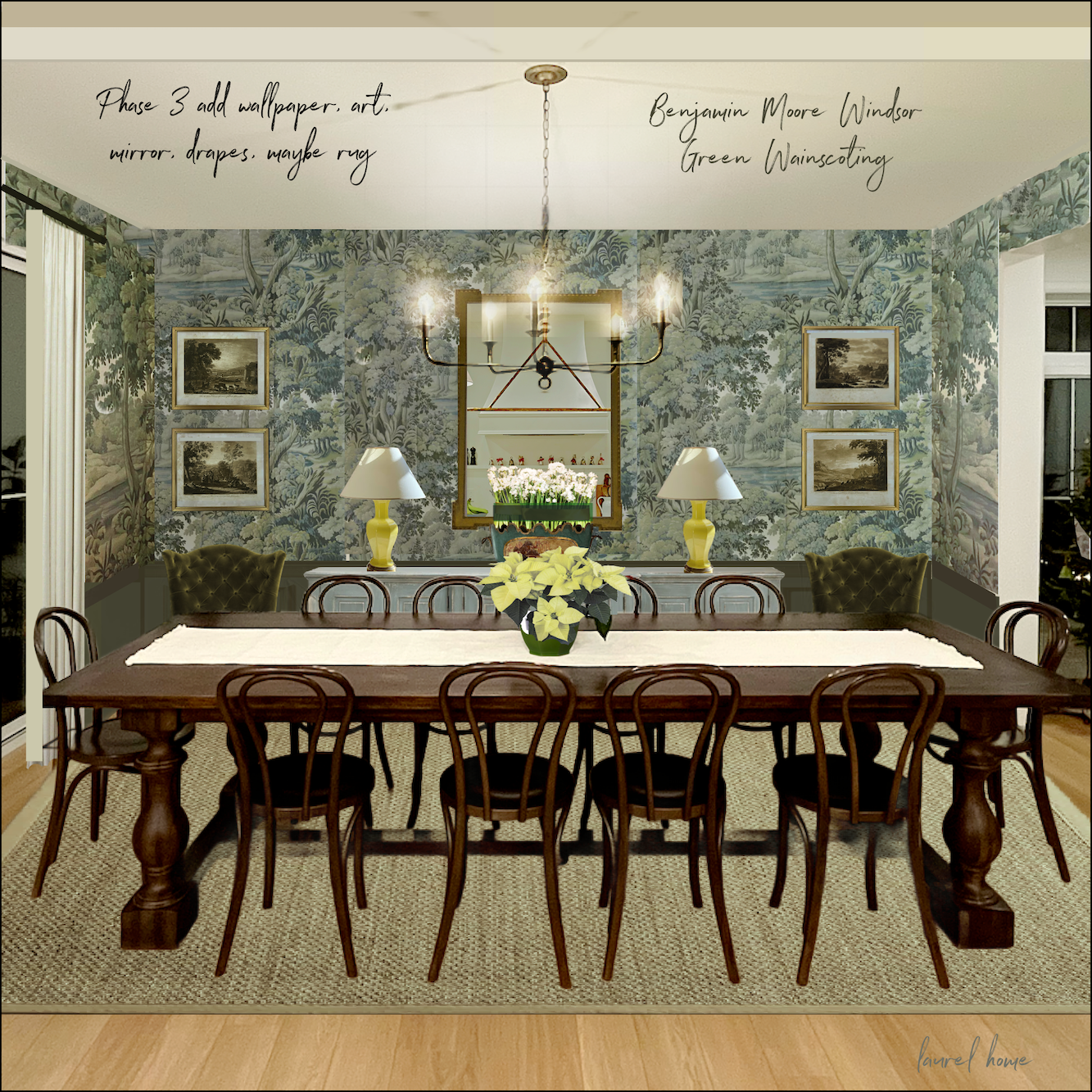
Like the one you did recently. How on earth did you get the chandelier to look like it’s really glowing?
Finally, I was looking at Serena & Lily because of their wonderful early spring sale, and I saw that they have a room planner.
I tried to use it and didn’t get too far. Have you seen it? Maybe there’s something easier to use?
I hope you can provide some guidance here!
xo,
Lerena Sillee
***
Hi Everyone! Happy Valentine’s Day!
Lerena (rhymes with Serena) is a fictitious character, but based on many of you! She has some terrific questions.
First of all, yes, creating floor plans, elevations, and mood boards, while not essential for creating a beautiful room, is all exceedingly helpful. This is true, especially if you’re not strong on visualizing or don’t have a lot of experience decorating.
However, do you need an art or graphic design background to use a room planner?
Well, it would be helpful if you did. But I don’t have an art or graphic design background.
So, how did I learn to do what I do?
I gained a lot of confidence in design school and learned VERY fast because I had no choice.
Still, I did learn the basics of perspective drawing, and we did dozens of floor plans and elevations. (You can see my interior design portfolio here, which is only about two-thirds of the major projects I did.
Creating furniture layouts isn’t difficult in terms of putting it down on paper or virtually. After a while, one learns that most furniture is within certain parameters. That is what the 333 Interior Design Rules & Tips guide is about.
As for mood boards, I will never forget back in 2010, I was at a client’s home, and she whipped out her tablet and showed me the mood board she made.
I was incredibly impressed and soon found a way to make my own mood boards.
Back then, there were some simple programs to make them. I found that when I put down the furnishings in one place, my clients made decisions far more quickly.
However, I needed more control and options when creating the boards. That is when Eileen Lonergan, my late mentor, told me in 2014 about Picmonkey. I immediately opened up an account and began teaching myself. I have always found the program to be quite intuitive.
Below is an early graphic I made. Many of you will remember it.


Early efforts above and below in 2015.

I also did stuff like this. (above) I was listening to my voicemail and discovered that my client’s coffee table came in damaged for the SECOND TIME!
(That post gets my vote for THE most lame blog post ever, or at least in the bottom ten. haha)
By 2018, when I created the gem below for the whistle blowing houzz post, I had gotten pretty proficient at head swapping. ;]

I don’t know about you, but I think I look pretty hot here.
😂 😂 😂
In 2019, I created a Picmonkey tutorial in this post that is a bit out-of-date because their interface has changed. And the monkey no longer winks. haha Shame, I miss that! However, it conveys the basic principles of layering images onto a virtual board.
I just updated one crucial thing because it’s easy to remove backgrounds in Picmonkey these days. It wasn’t in 2019.
If there’s enough interest, I’ll be happy to update the entire Picmonkey tutorial post.
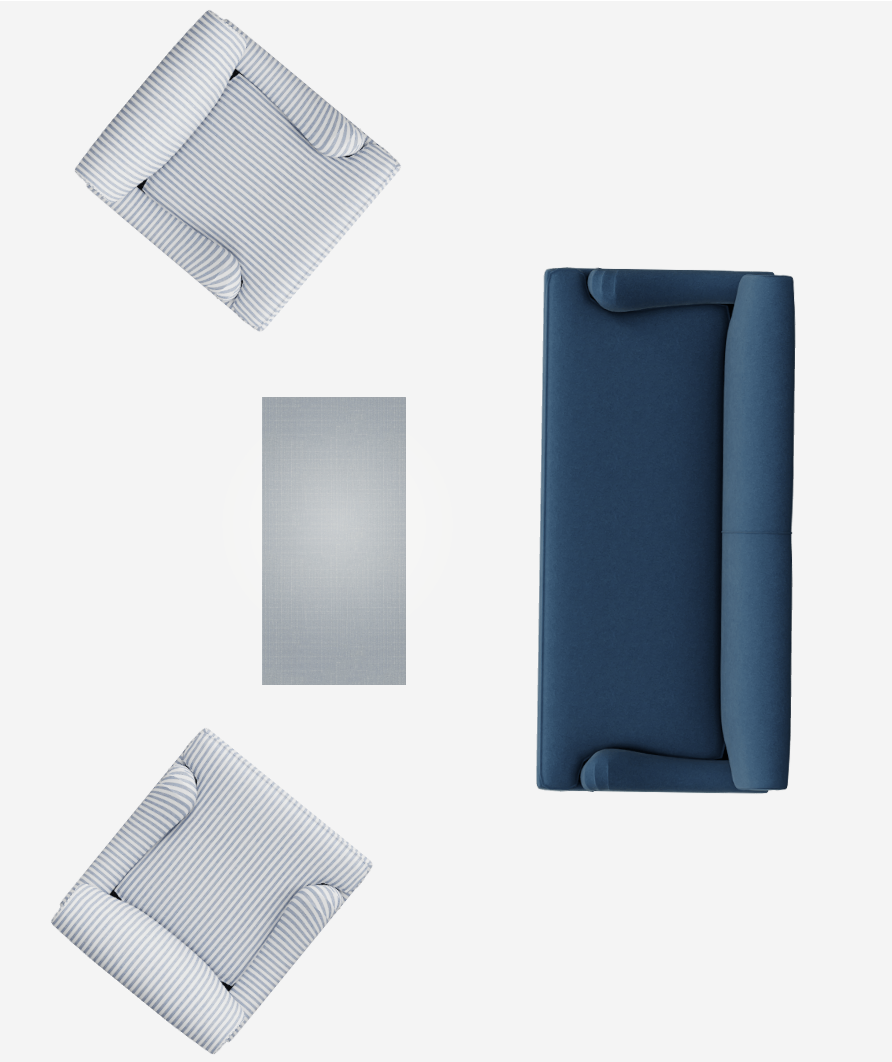
In the meantime, I tried the Serena & Lily room planner. (See it below and see the room planner by clicking this link.)
It’s pretty intuitive, but a bit clunky and has a lot of limitations.
For instance, I couldn’t make the round bay in my living room.
Below, took me about 45 minutes to make.
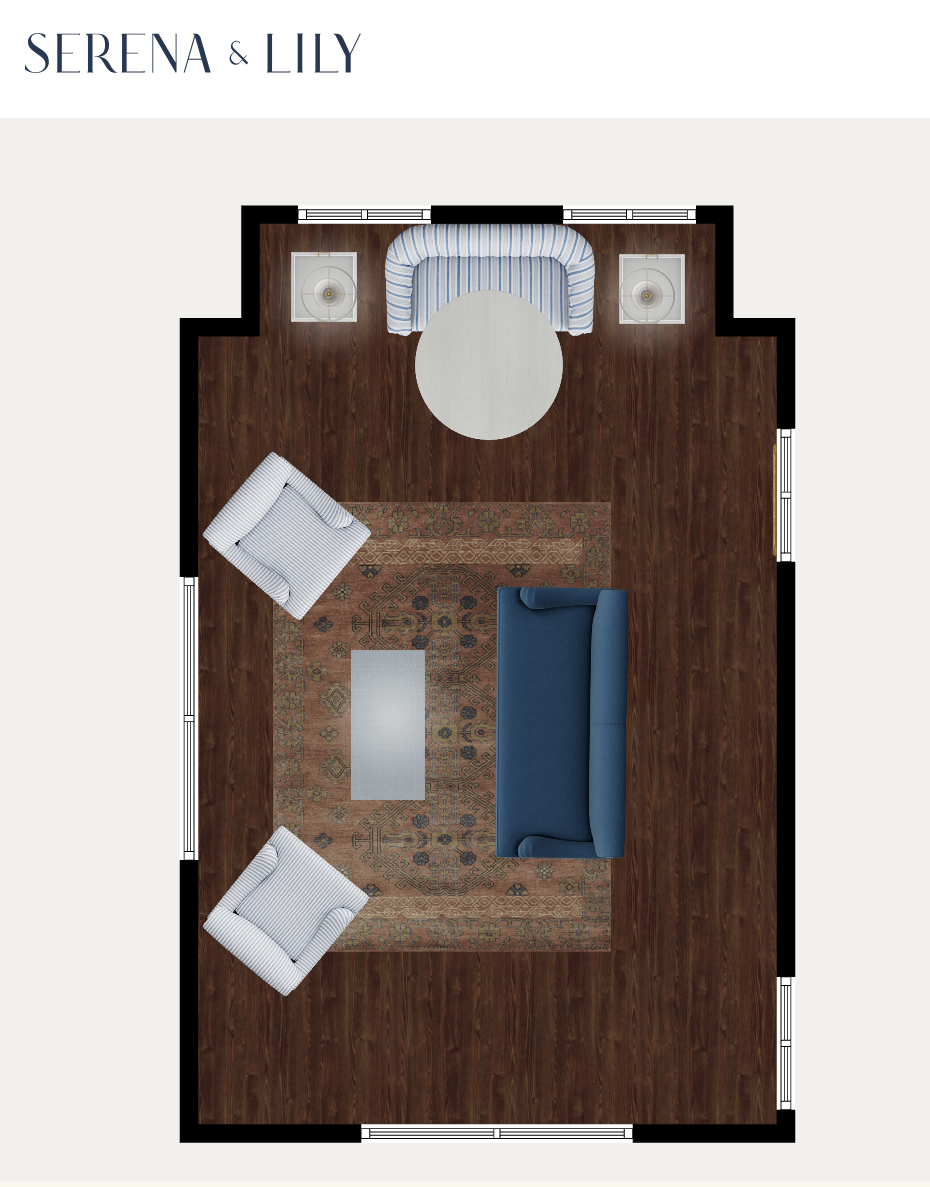
It’s not bad. Of course, it’s only using furnishings sold at Serena & Lily. As “Lerena” pointed out, S&L is having a fantastic sale right now. Up to 25% off!
I know it’s not a totally fair comparison, but I still think it’s a lot easier to use Picmonkey as a room planner because:
- You can use graph paper for scale purposes to get the scale perfect.

- And you can use your own images. Any image. Plus, you can create special effects.
I made all of my book covers, gifs and relocated heads via Picmonkey.


At the beginning of the pandemic.
What you could do, however, is if you’d like to see a sofa or chair shape that looks like a sofa or chair, you could make those with the Serena & Lily room planner and then cut and paste them onto your board. You could even keep a library of furniture in a folder on your desktop.
Do you have to pay for Picmonkey, Laurel?
I had to check that. I have the pro version, which is $130 a year, including tax. I believe there’s a free version or at least a lower-cost version.
My question for you guys is this:
Do any of you who aren’t graphic designers know of a simple program for creating floor plans? Ideally, you should be able to use your own images if you’d like to add a rug, for example.
I don’t know of any that are easy that have that same kind of flexibility. I’ve enjoyed using Picmonkey.
To show you, I just did my living room floor plan in Picmonkey. This entire thing took maybe 90 minutes. However, I put a lot of detail in.
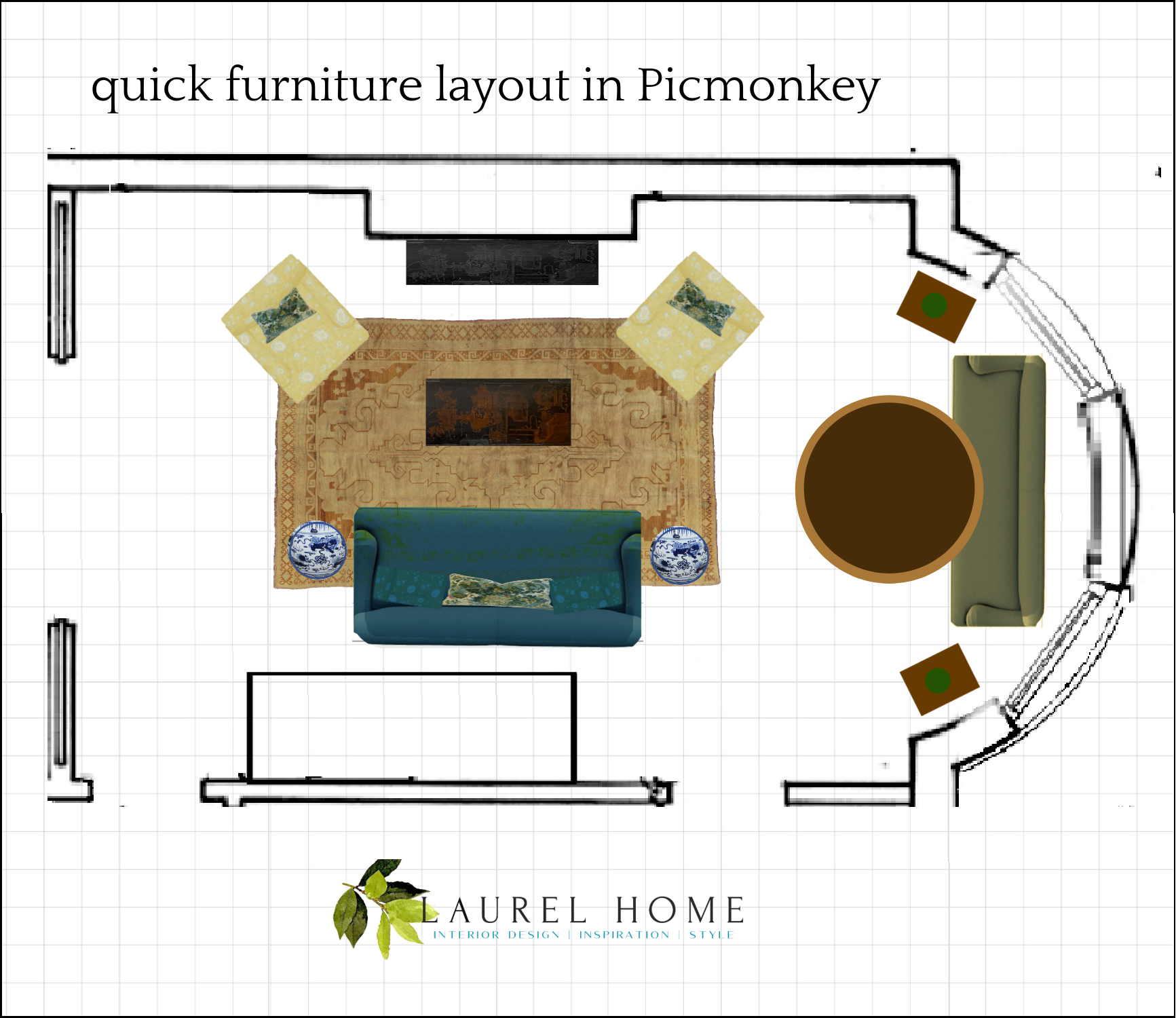
The yellow chairs were achieved by resizing and tweaking the colors from one of the Serena & Lily fabrics. The grid is essential to get the scale perfect. I keep mine in a “hub folder” on Picmonkey. The logo is there, too.
While creating this, I pretended for a time that I was doing a tutorial.
It would be a relatively healthy way to put y’all to sleep if you don’t die of boredom first. ;]
I would need some sort of a stand for my phone, and it would also require a lot of editing because no one will sit around for 90 minutes to learn this. The time it takes isn’t learning time. It’s fiddling time. And a lot of ummms and oops, and hang on…
Like I said… However, I can continue with a more in-depth tutorial, and I would do my best to make it fun to watch. But I need at least a dozen of you to say you’d like to see that. Or, I could also just revise the old Picmonkey post.
Please let me know.
xo,

***Please check out the recently updated HOT SALES
There was a Presidents’ Day edit for this long weekend, with some of my favorite sales happening right now. Please check out all of the boards to see many of my favorite Serena & Lily furnishings. Also, there are some new sales!
Also, if you’re doing some shopping on Amazon, please click this Amazon affiliate link or the graphic below.

Thank you so much!
I very much appreciate your help and support!
Related Posts
 A Hollywood Regency Style Inspired Media Room
 Can This Dysfunctional Kitchen Be Saved?
 How I’m Developing My Room Colors (Parts 1 and 2)
 12 Days of Christmas | last-minute gifts | $25 and under!
  Little-Known Sources for Magical Holiday Decorating
 COTY 2023 – Two Companies – One Winner!
 How To Select The Perfect Color Scheme For Your Home





40 Responses
I would be grateful for the Picmonkey tutorial. Thanks!
Have you tried Spoak? It seems to be getting a lot of praise amongst the non-tech savvy crowd.
I would love an updated PicMonkey tutorial!
Yes please to the tutorial! You are so kind to continue to share your knowledge with us. I appreciate everything you share. And thanking you in advance for my 77 year old husband who doesn’t want to move our furniture anymore!
Hi Laurel,
I’m a muralist and interior designer and have been loving your posts for years.
During the pandemic, my tech saavy husband gave me a quick tutorial on the very inexpensive planner, “Live Home 3D”. It’s been an incredible tool to design interior renovation floor plans and furniture layouts. I used to draw everything by hand on graph paper and had to erase and redraw a lot. Now, I lay out the floor plan in scale on this program and then there’s a bunch of furniture and finishes to choose from to place in the rooms. You have the choice to view what you’ve laid out as a floor plan, an elevation for each wall or in 3D. It’s all cartoonish depictions, so you can’t see depictions of the actual furniture you want to use, but you have control over the size, colors and patterns (although not fashionable). It’s been super valuable for me to show clients how their rooms and furniture layouts will look, walking them through the rooms in 3D – even remotely. You can place windows, doors and fireplaces in scale on the walls. And, it’s so helpful for me to select sizes of pieces to see the relationships between the pieces. No more cutting up colored paper to move rugs and furniture around on my graph paper floor plans. So, easy to make changes on floor plans now. The only thing I haven’t mastered is any kind of tricky sloping ceiling. I’m not usually great at computer stuff but I found the learning curve for this program logical and pretty easy once you know the basics. A mood board, using another program or cut out pix can accompany this and/or highly organized Pinterest boards shared with the client with suggested items for purchase.
First of all, I’m still laughing at your iteration of The David. Michelangelo has nothing on you!!
I would love a tutorial on pic monkey. I may not use it for my own house at this stage of my life but I’m sure my daughters would love the help as they navigate changes to their homes. Mom could actually be a valuable commodity. 😂
Yes to a picmonkey tutorial. I am still fantasizing about putting up my own website.
I sure would love to do interior design for my personal home. Seeing colors in place on my actual walls with my furniture would give me courage for the color drenching I want to try.
A monthly, picmonkey subscription is about $8.
Yes please! For a Picmonkey tutorial. Love your blog Laurel, thanks for the time you invest in creating it!
I’m dying on the switching of “Picmonkey” to “pulmonary”. Gotta love spellcheck!
Haha! I thought maybe it was in my post. The spellchecker should know Picmonkey, but I guess not.
Laurel, I would pay for you to teach me Picmonkey! I tried & failed, but since then, paid $200 for a course to learn how to make printable. LOVE. IT. My mad-phat skills in Canva are growing exponentially. Would love to know pulmonary, too! And I would pay the same to learn, for what it’s worth. You are a teacher par excellence!
I’d love any tutorial as I don’t even know how to use AI to do anything. I normally do things on graph paper and know there are better ways to use a computer for simple designs. Please give any advice!
Bring on the tutorial! Thank you for offering to do it!
Thank you!
I would love a tutorial on pic Monkey! Thanks!
Laurel,
I would also love a PicMonkey tutorial. As always, thanks so much for sharing your knowledge.
The reason I didn’t go into design was the technology piece. I’m one ditz on a computer, so yes, I would love a tutorial. Thank you!
Cynthia Lambert–I was wondering the same–why not try Grok? I have only recently started using it for basic inquiries. Have you made any AI design efforts? Any tips? Thanks!
Yes, please, I’m adding my voice to the chorus! We’re about to move from a larger home & convert our vacation house into a year-round residence – the tutorial would be incredibly timely. I’m a longtime fan, have been following your blog & business for well over a decade.
Ballard Designs also has a room planner. I found it extremely helpful in planning furniture layouts for both my daughter’s and my room arrangements. It also helped in deciding on scale of different furniture pieces when planning any purchases. Only major downside is furniture choices are all Ballard products but there is enough of a variety that it’s easy to get a general idea of how one’s room would look. And you can customize the measurements of some general shapes/pieces. It simply takes having the patience to play and experiment with the design tool.
I would like the Picmonkey tutorial too. I have been using the Interior Design Pro app on my iPad and iPhone for floor planning and furniture placement. It beats moving heavy furniture around until you are sure it will work. You input dimensions for everything and work with existing furniture in the app. The dimensions can be changed for that too. I know there is some way to change the color and pattern of furniture because I did it a few years ago and can’t remember how 🙈. The sticker feature for iPhone photos is great for removing backgrounds when adding items to my mood boards which I do on google slides.
Please please please. I am just finishing up my kitchen with Crown Point and am so so tired of cutting and pasting things together to see how it goes with my attached breakfast nook.
PS. I ended up at crown point because of your post when doing your kitchen.
Yes, please, I would love a picmonkey tutorial and any advice about organizing images for creating floorplans. Thank you!
Yes, please! I have too many ideas for a couple of small rooms, but can’t come close to imagining what my spaces might look like. A tutorial would be brilliant!
YES YES YES Please do a new Pick Monkey! And THANK YOU!!
Laurel, I would love a new tutorial on pic monkey. Only the free version though. I used a floor plan program (floorplanner.com – the free “basic” version) when designing my home and it did help with determining room size, furniture layout, etc. and even exterior landscape planning.
Yes! I would love to see the tutorial and learn from you!!
Hi Laurel,
I first learned about PicMonkey from your blog. I purchased the program, but I know I am not utilizing it to its full potential. An example is when I can’t copy an image as a jpeg. A tutorial would be greatly appreciated!
Thank you.
90 minutes? Who’s got an hour and a half to faff about with a one room plan? ChatGPT or other AI can do it for you in 10 seconds.
Oh, yes please! Would love your picMonkey tutorial! Love all of your posts even though I rarely comment.
Yes, I’d love to see your tutorial. Knowing it will fit and being able to visualize how it will look before making a change might save a marriage if you are enlisting your spouse for help moving furniture. To discover the new arrangement doesn’t fit and you end up moving everything back doesn’t go over well.
I would love a tutorial as I don’t have a clue how to use it. I plan on moving to a greatly downsized house in 1-2 years and am at a loss as to what furniture to keep. I don’t have dimensions as of yet and don’t even have the house yet! but am hopeful something will magically appear. I want to avoid last minute confusion and mayhem. Maybe by the time I can figure out Picmonkey, I’ll have a new place to design. Thank you, Laurel – how I love your blog! Elizabeth
Dear Laurel,
I’d love to see your pick monkey tutorial as well! I absolutely love decorating, but I am a teacher, not a designer. I love reading your blogs too!
~Michelle
Please do the tutorial! And as Ann said, we are not all intuitive. Thank you in advance.
Dear Laurel,
I would love a picmonkey tutorial! My husband and I are restoring an 1853 Regency cottage in Ontario. There are times that I try to explain my vision to him and all I get is look of total confusion!
Please, do a tutorial. I tried picmonkey years ago and could not get the hang of it. If you do it Laurel, remember some of us are not intuitive, and know next to nothing about these kind of programs!
Laurel,
I have PicMonkey now because you use it, and I am tired of drawing over photos on my Android to get a visual of ideas I have done that for myself and friends. It takes for ever and my additions look like cartoons though Pretty please give us your tutorial. I was sooo excited when I saw your topic for this post, it’s just what I have been hoping for.
Hi, I’m in the same boat as Marlene, restoring an old maison de maitre in the SW of France and the tutorial would be really useful. Thanks, Melanie
Dear Laurel,
PLEASE create a Picmonkey tutorial! We are renovating an historic home in the southwest of France and need all the help we can get. I have all of your toys from your toolbox–this will really help me to use them!
Merci from CDG-Paris,
Marlène
Hi Laurel
Before I opened your email I was scrolling through my usual Martha Stewart and others when an item said …”checkerboard flooring, how to design vintage with turquoise.
Gosh Laurel, you had all this and more with your own ideas for your home.
Wow, you are certainly way out in front with your designs and I never miss your emails reading everything.
It’s so reassuring for me when I do my paper drawing board with coloured pencil shapes.
Rosemary
Hi Laurel
I would love to read your new pick money tutorial!
Cheers.
Mel